Why architecture matters from day one
Most Flutter projects become unmaintainable after 6 months. Business logic mixed with UI, untestable code, and features that break other features. A solid architecture prevents this.
Add features without fear
Clear boundaries mean new code does not break existing features
Test with confidence
Separated layers allow unit testing without mocking everything
Onboard developers faster
Consistent patterns mean less time explaining where code goes
Swap backends easily
Firebase to Supabase? Change one layer, UI stays untouched
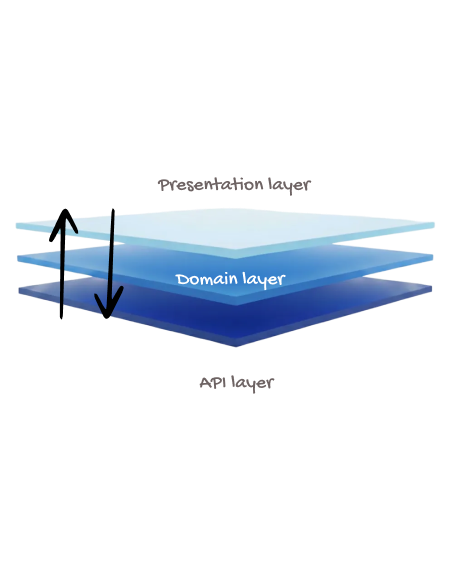
Three-Layer Architecture

Riverpod Built-In

Modular Folder Structure
Save 3 months of work
One command. Pick your modules. Firebase or Supabase auto-configured. Start building what matters.

See the pattern in action
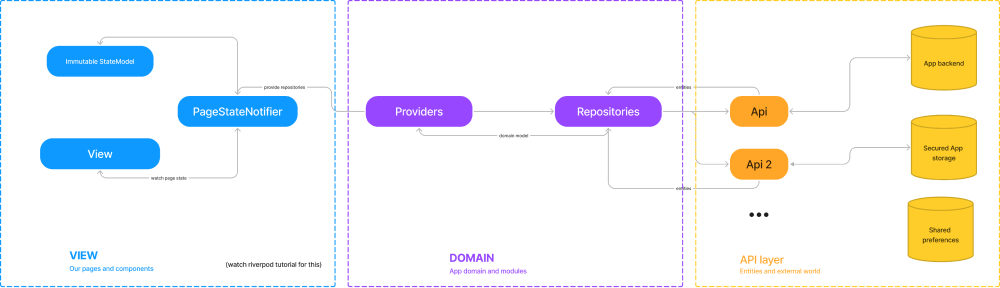
Here is how data flows through the layers. The UI never touches the API directly - it goes through the domain layer where business logic lives.
Easy to test
Fake the API, test the notifier logic in isolation
Easy to change
Switch from REST to GraphQL - only API layer changes
Easy to understand
New developers know exactly where to look.
Built on 7 core principles
Separation of Concerns
Each component has one job and does it well
Testability
Every layer designed to be tested independently
Scalability
Add features without restructuring existing code
Maintainability
Updates and bug fixes stay contained
Performance
Riverpod rebuilds only what changed
Modularity
Features can be added or removed independently
Reactivity
State changes propagate automatically to the UI
Folder structure that scales
Every generated project follows this structure. Whether you are building a simple app or a complex platform, you will always know where code belongs.
lib/
├── core/
│   ├── data/          # Shared APIs, entities, models
│   ├── states/        # Global states (user, subscription)
│   ├── initializer/   # App startup services
│   └── widgets/       # Shared UI components
│
└── modules/
    └── auth/          # feature module - independent
        ├── api/       # Auth API calls
        ├── entities/  # Auth data models
        ├── domain/    # Auth business logic
        ├── providers/ # Auth Riverpod providers
        └── ui/        # Auth screens & widgets
Architecture that makes testing easy
Good architecture is testable architecture. When layers are separated, you can test business logic without spinning up the entire app. We use fakes instead of mocks - they test real behavior, not implementation details.
Fakes over Mocks
Test business logic, not implementation. Changes to code do not break tests unless behavior changes.
Unit Tests
Test repositories and notifiers in isolation. Fast feedback, easy debugging.
Widget Tests
AppWidgetTester extension creates realistic test environments with navigation and state.
Multi-Device Testing
DeviceTestExtension runs tests across multiple screen sizes automatically.
Testing philosophy
We do not chase 100% coverage. We test what matters: business logic, user flows, edge cases. Write tests before code. Fix bugs by writing a failing test first, then fix it.
Start with architecture that works
Skip months of architectural decisions. Get a production-ready structure from day one.
