Building apps often means controlling who can see what pages. Sometimes, you need to check something, like if a user is logged in, before showing them a specific screen.
What is a Page Route Guard?
A page route guard is like a security check for your pages. Before a user lands on a page, the guard runs a check. If the check passes (the condition is true), the user sees the page. If the check fails (the condition is false), the user is sent somewhere else, like a login page.
Why Use a Guard?
Guards help you keep parts of your app safe and control the user flow. They are great for protecting pages that require a user to be logged in, have certain permissions, or have completed specific setup steps.
How Does it Work?
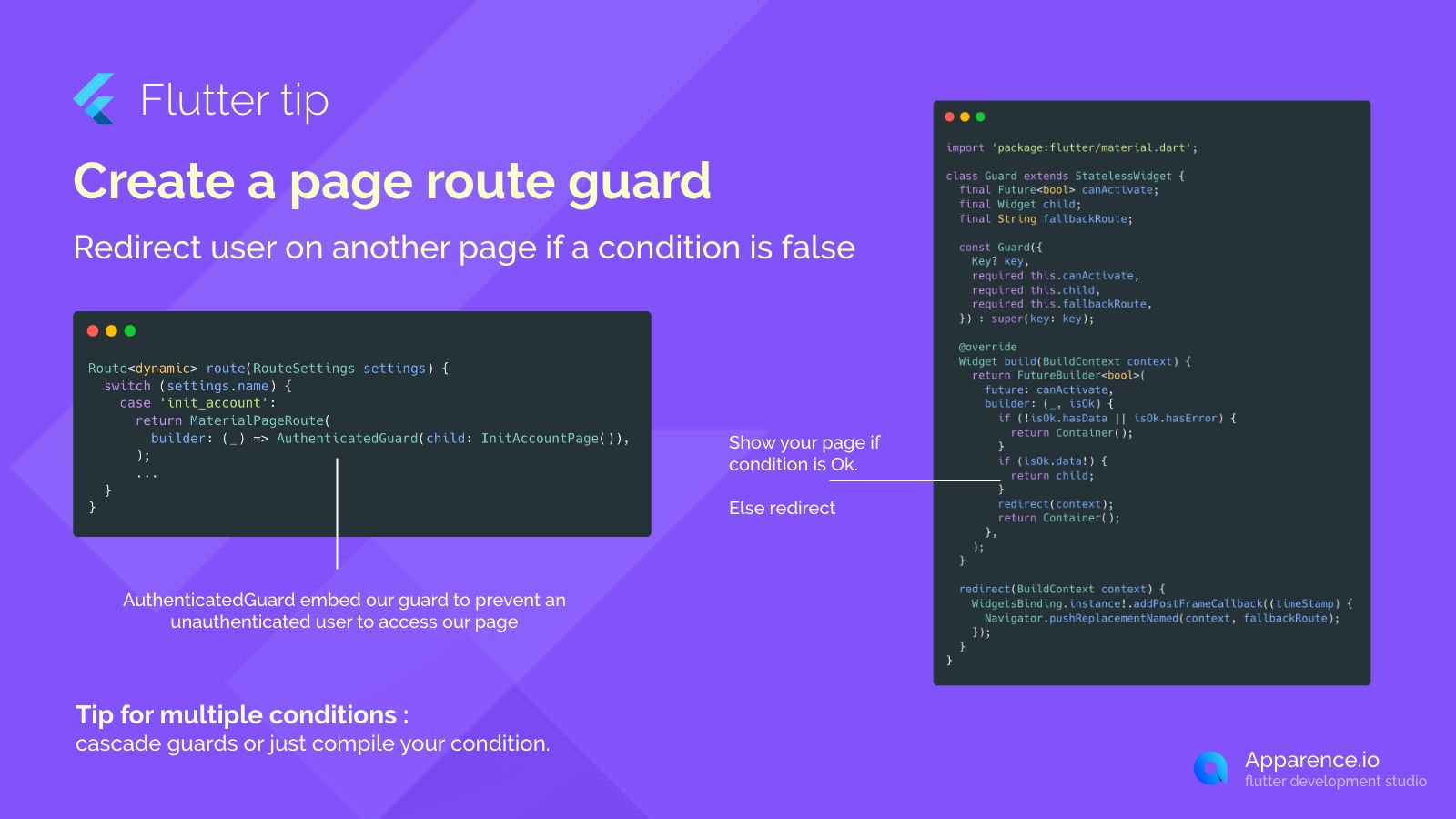
The image shows a simple Guard widget. This widget checks a condition using a Future<bool> canActivate. A Future is used because checking a condition might take some time, like fetching data from the internet.
Here's the basic idea:
The Guard Widget Logic
- It takes a
canActivatefuture (your condition check). - It takes the
childwidget (the page you want to show if the condition is true). - It takes a
fallbackRoute(the page to go to if the condition is false). - It uses a
FutureBuilderto wait for thecanActivatefuture to finish.
What Happens After the Check?
- If
canActivateis true, it shows thechildpage. - If
canActivateis false or there's an error, it usesNavigator.pushReplacementNamedto send the user to thefallbackRoute. ThepushReplacementNamedmakes sure the user can't just hit the back button to get to the restricted page.
Using the Guard in Your Routes
You can wrap the widget for a specific route with your custom guard, like an AuthenticatedGuard.
Route<dynamic> route(RouteSettings settings) {
  switch (settings.name) {
    case 'init_account':
      return MaterialPageRoute(
        builder: (_) => AuthenticatedGuard(child: InitAccountPage()),
      );
    // ... other routes
  }
}
This way, the InitAccountPage will only be shown if the AuthenticatedGuard's condition is met. Otherwise, the user will be redirected.
Handling Multiple Conditions
What if you need to check more than one thing? You have a couple of options:
Option 1: Cascade Guards
You can wrap a page with multiple guards, each checking a different condition. If any guard's condition fails, the user is redirected.
Option 2: Compile Conditions
You can combine all your conditions into a single canActivate future within one guard. This might make the logic cleaner but requires more complex logic inside the guard itself.
Using page route guards is a clean way to manage access control and navigation flow in your Flutter app, making it more robust and secure.
Our social login template comes with route guards for authenticated pages already configured.