Draw a timer

Gautier Siclon
Gautier Siclon

Co-founder, Apparence.io

Flutter tips · Published on

Drawing Timers in Flutter

Creating custom UI elements like timers in Flutter is straightforward using the CustomPaint widget.

Using CustomPaint

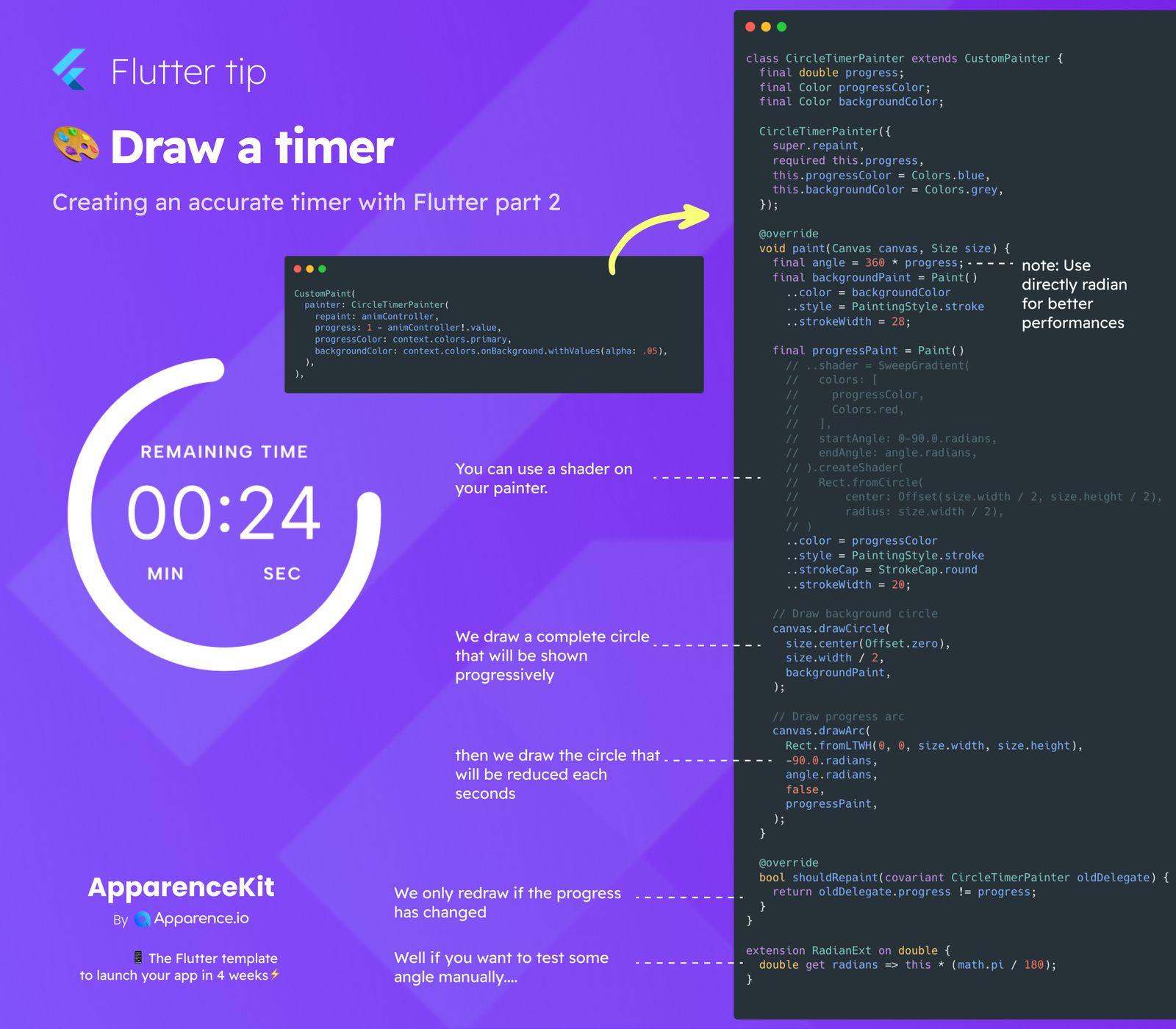
CustomPaint lets you draw directly onto the screen using a painter. You provide a CustomPainter object that handles the drawing logic.

The Timer Painter

Our timer uses a CircleTimerPainter. This painter is responsible for drawing the visual representation of the timer.

How it Draws

The painter draws two main things:

  • A full circle for the background of the timer.
  • An arc that shows the timer's current progress.
Showing Progress

The arc's length visually represents the remaining time or progress. It changes progressively as the timer runs.

Efficient Updates

To keep things smooth, the painter only redraws itself when the progress value actually changes. This is handled efficiently in the shouldRepaint method.

Save 3 months of work

One command. Pick your modules. Firebase or Supabase auto-configured. Start building what matters.

kickstarter for flutter apps

Frequently Asked Questions

How do I draw a custom timer in Flutter?

You can use the `CustomPaint` widget along with a custom class that extends `CustomPainter`.

What is a CustomPainter?

A `CustomPainter` is a class used with `CustomPaint` to define how to draw custom graphics on the canvas.

How does the timer show progress visually?

It draws an arc that changes length as the timer counts down, giving a progressive visual effect.

Does the timer redraw constantly?

No, the painter is designed to only redraw when the progress value changes, making it more efficient.

Read more
You may also be interested in
Made by ApparenceKit logo
Featured on Twelve Tools
ApparenceKit is a flutter start kit | template generator tool by Apparence.io © 2026.
All rights reserved