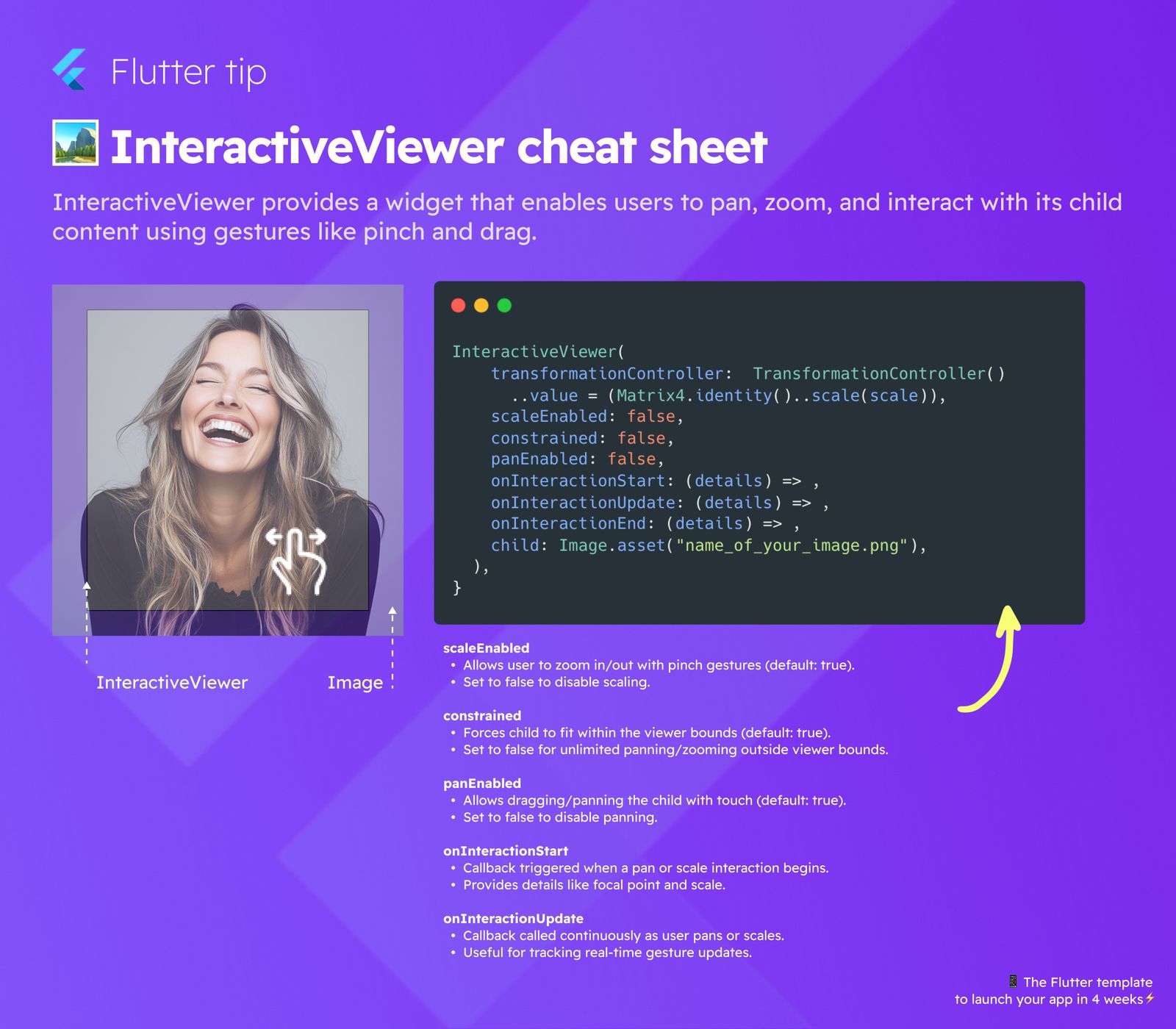
Need to let users pan, zoom, or drag content in your Flutter app? The InteractiveViewer widget is here to help!
It makes adding interaction using simple gestures like pinching and dragging super easy.
Key Properties Explained
scaleEnabled
This controls if users can zoom in or out using pinch gestures.
- Set to
true(default) to allow scaling. - Set to
falseto turn off scaling.
constrained
This property affects how the child fits within the viewer.
- Set to
true(default) to force the child to fit inside the viewer area. - Set to
falsefor free panning and zooming outside the viewer boundaries.
panEnabled
This determines if users can drag or pan the content with touch.
- Set to
true(default) to allow dragging. - Set to
falseto disable panning.
Useful Callbacks
InteractiveViewer provides callbacks to know when interaction happens.
onInteractionStart
- This function runs when a pan or zoom starts.
- It gives details like where the interaction began and the current scale.
onInteractionUpdate
- This function is called continuously as the user pans or zooms.
- It's great for tracking live gesture updates.
onInteractionEnd
- This function runs when a pan or zoom interaction finishes.
Using these simple options, you can quickly add rich interaction to your images or other widgets in Flutter.