Make AI Your Coding Clone
AI tools are incredibly powerful, but they are trained on a vast amount of generic data. This means they often don't naturally understand the specific coding style, architectural patterns, or conventions unique to your project or team. To truly harness AI as a productivity powerhouse, you need to teach it your way.
Why Custom AI Rules Matter
Generic AI, by design, comes without specific opinions on code architecture or project-specific nuances. While this broad understanding is useful, it means the AI won't automatically generate code that perfectly matches your preferred methods. Imagine having a super-fast clone of yourself or your best developer, one that instantly grasps and applies all your standards. That's the goal with custom AI rules.
This is precisely why defining and constantly improving a set of rules for your AI is crucial. It ensures that the AI generates code, suggests improvements, and refactors existing work exactly how you would, but at lightning speed.
How to Create and Use Your AI Rules
Setting up your personalized AI rules is a straightforward process.
Step 1: Create a Rules File
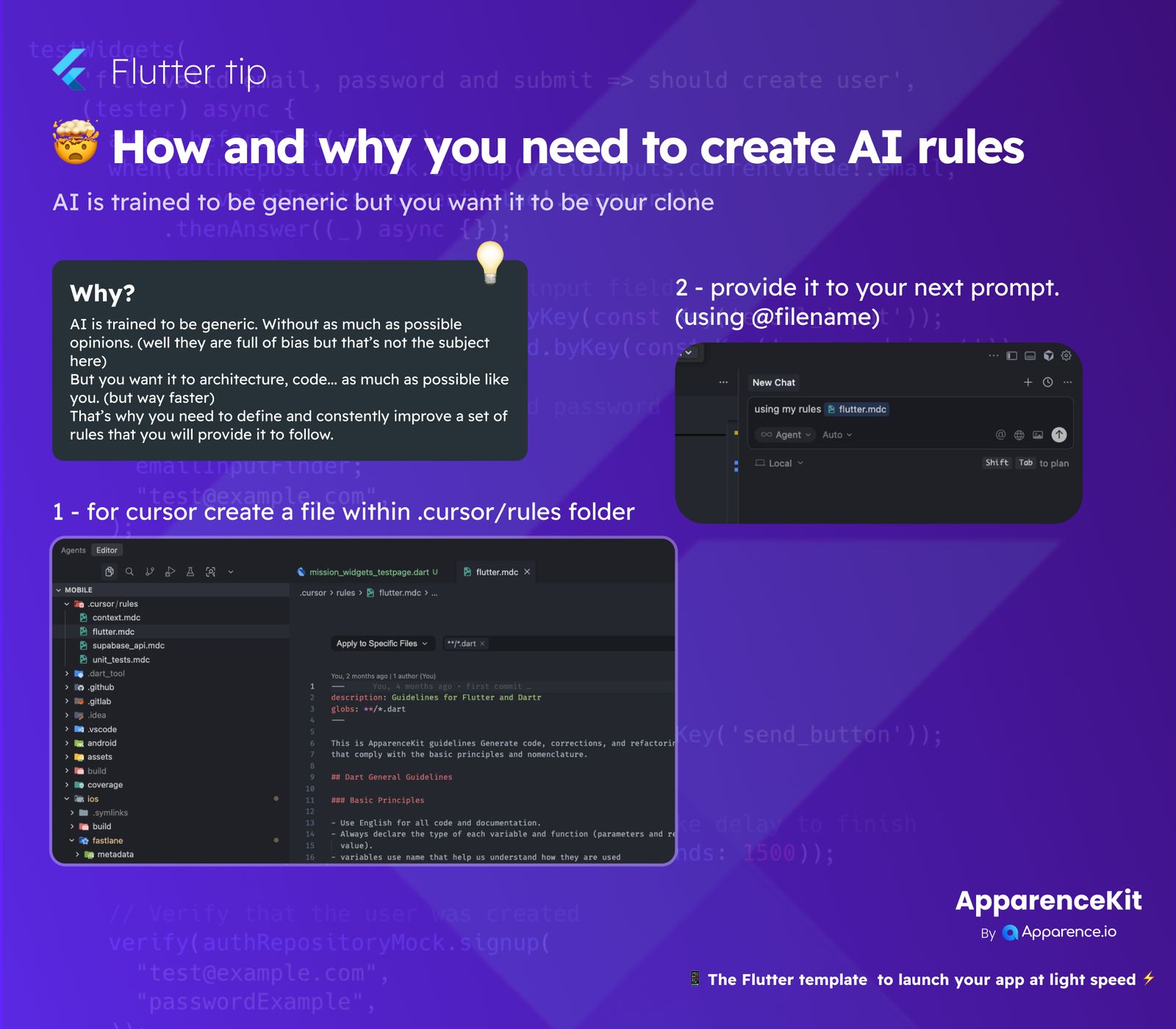
Within your project, create a new file inside the .cursor/rules folder. A common practice is to name it relevant to your project or language, for example, flutter.mdc. This file will house your specific guidelines and preferences.
Here’s an example of what your flutter.mdc file might contain:
description: Guidelines for Flutter and Dart
globs: **/*.dart

This provides ApparenceKit guidelines for generating code, corrections, and refactoring
that comply with basic principles and nomenclature.

## Dart General Guidelines
### Basic Principles
- Use English for all code and documentation.
- Always declare the type of each variable and function (parameters and return
  value).
- Variables use names that help us understand how they are used.
This example demonstrates how you can define rules that apply specifically to Dart files (**/*.dart) and outlines fundamental principles like language usage, explicit type declarations, and clear variable naming.
Step 2: Provide Rules to Your AI Prompt
Once your rules file is created and saved, you can easily reference it in your AI prompts. When interacting with the AI, simply instruct it to "use my rules" followed by the filename, like @flutter.mdc. This command tells the AI to apply the guidelines defined in that specific file to its responses, ensuring consistency and adherence to your standards.
By following these simple steps, you transform your generic AI into a highly personalized coding assistant. This assistant will be perfectly aligned with your project's unique standards, significantly boosting your development efficiency. This powerful approach is part of what ApparenceKit offers, providing a Flutter template to launch your app at light speed.