Fixing Clipped Widgets in Flutter
Have you ever faced a situation where part of your Flutter widget just won't show? It seems to be cut off by its parent container, especially when you try to make it slightly overlap an edge. This common issue happens when a child widget attempts to draw outside the area defined by its parent.
The Problem
Imagine you're designing a card and you want to add a small badge or icon that subtly peeks out from the card's top-right corner. By default, many Flutter widgets, like Stack, will "clip" any content that goes beyond their own borders. This means your carefully placed icon gets chopped off, ruining your intended design.
Before the Fix
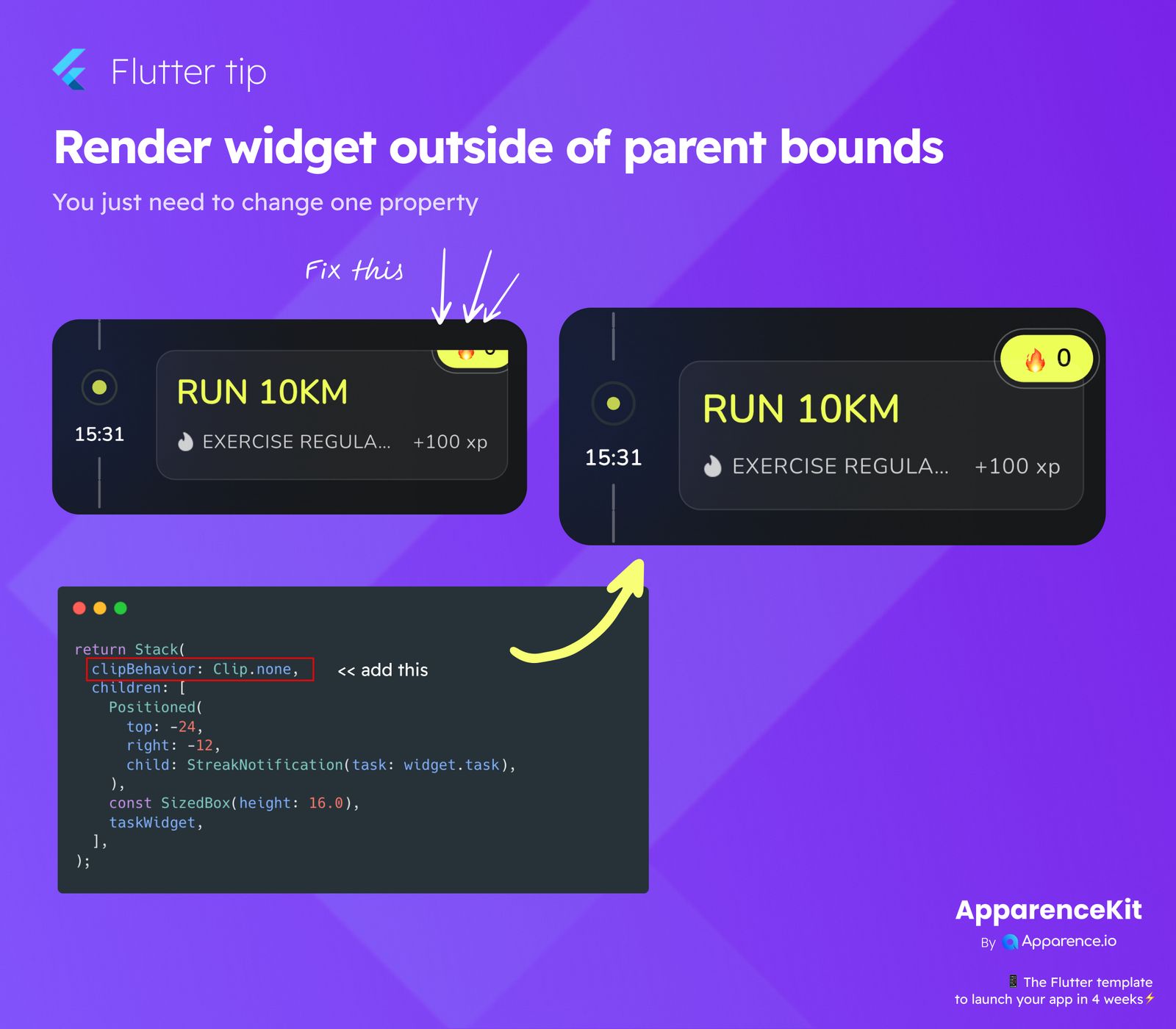
You might observe that a significant portion of your widget, like a notification badge, is missing or only partially visible. This occurs because the parent widget, by default, acts as a strict boundary, preventing its children from drawing outside its own visible region.
The Simple Solution
Great news! Fixing this clipping issue is incredibly straightforward. You only need to adjust one property on your Stack widget.
How to Implement
When utilizing a Stack widget to layer your user interface elements, simply add the clipBehavior: Clip.none property to it.
return Stack(
  clipBehavior: Clip.none, // Add this line to prevent clipping!
  children: [
    Positioned(
      top: -24,
      right: -12,
      child: StreakNotification(task: widget.task),
    ),
    const SizedBox(height: 16.0),
    taskWidget,
  ],
);
By setting clipBehavior to Clip.none, you effectively tell the Stack that it's permissible for its child widgets to draw outside of its own defined boundaries. This allows your widgets to render completely, even if they extend beyond the Stack's usual content area.
After the Fix
With clipBehavior: Clip.none applied, your badge or any other overlapping element will now display perfectly, exactly where you intended to position it, without any unwanted clipping. This minor adjustment can significantly help in achieving your desired UI designs and visual effects.
This quick Flutter tip empowers you with more control over your UI layout, enabling you to create more dynamic and appealing designs where elements can freely extend beyond their immediate parents.