Protecting your app's pages is crucial. You want to make sure users only see content they are allowed to access. This often means redirecting them to a different page, like an onboarding screen, if they haven't completed certain steps or don't have the right permissions.
Redirect Users Based on Access
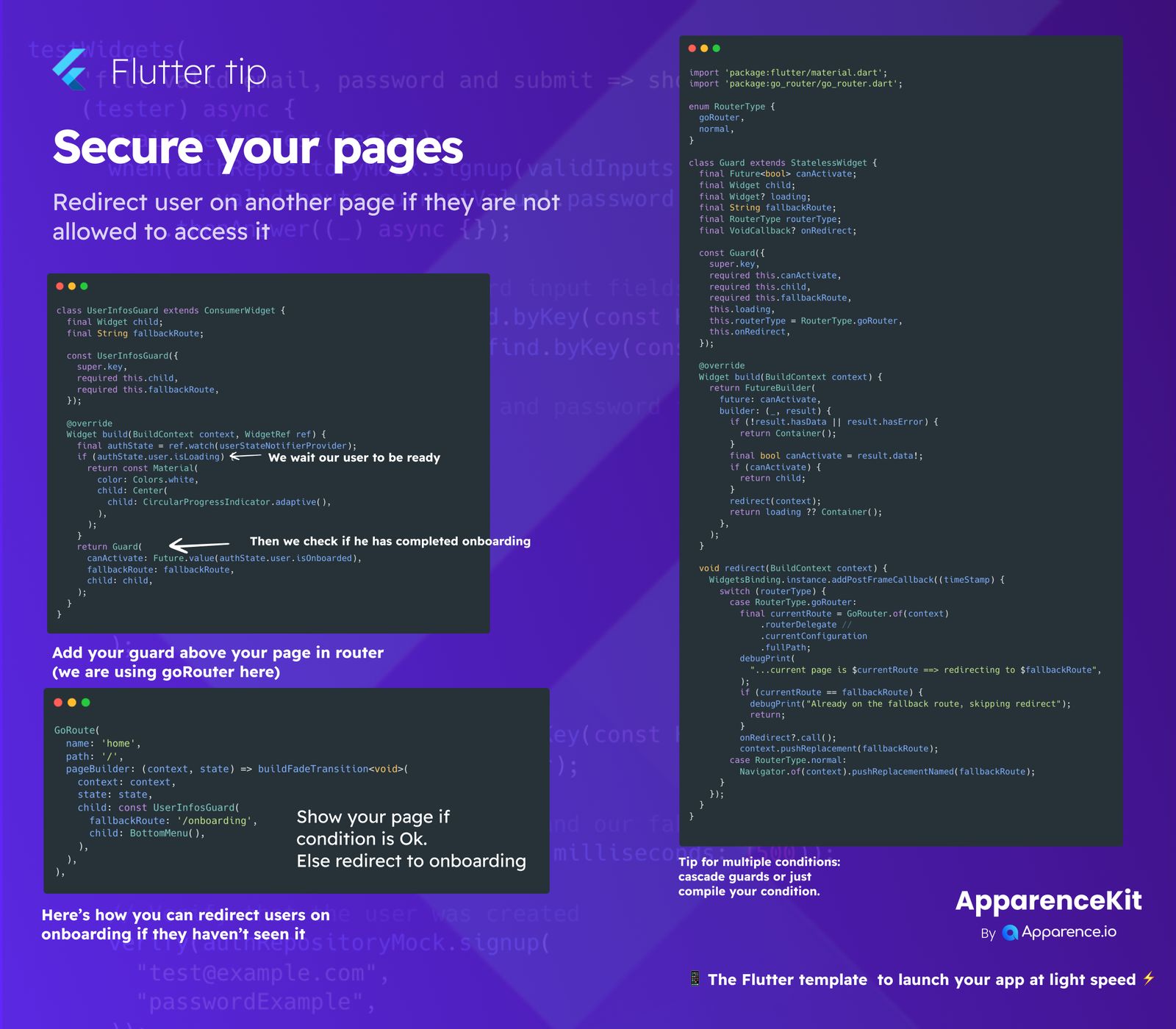
Imagine a scenario where a user needs to complete an onboarding process before accessing the main parts of your app. We can achieve this by creating special 'guards' that check user status and redirect them if needed.
Building a User Info Guard
We can create a UserInfosGuard widget that wraps around your page content. This guard will do a couple of things:
-
Wait for User Data
First, it waits until the user's data is ready. While loading, it might show a simple loading indicator.
-
Check Onboarding Status
Once the user data is available, it checks if the user has completed their onboarding. If they haven't, the guard will use a
fallbackRouteto send them to the onboarding page.
How a General Guard Works
A more general Guard can be used for various conditions. It takes a future that resolves to a boolean (canActivate). If canActivate is false, it triggers a redirect.
Handling Multiple Conditions
For complex situations with many checks, you can use multiple guards (cascade guards) or combine all your conditions into one comprehensive check.
Integrating Guards with goRouter
When using a routing package like goRouter, you can easily add your guards directly to your route definitions.
Adding Your Guard to a GoRoute
Inside your GoRoute setup, you'll place your UserInfosGuard as the child of the route. Specify the fallbackRoute that users should be redirected to if they don't meet the conditions.
For example, if the user hasn't onboarded, they will be sent to the /onboarding route instead of the 'home' page.
The Redirection Process
The redirection logic ensures a smooth user experience. When a redirect is triggered:
- It first checks the current page. If the user is already on the
fallbackRoute, it intelligently skips the redirection to prevent loops. - Then, it uses
context.pushReplacement(or a similar method) to navigate the user to the specifiedfallbackRoute, ensuring they can't simply go back to the restricted page.
This approach helps you launch your app with confidence, knowing your pages are secure and users are guided through the correct flows.
ApparenceKit provides a Flutter template designed to help you launch your app at light speed, often including robust solutions for page security.