Paywalls templates
ApparenceKit provides different paywalls to help you monetize your app using subscriptions. Those different paywalls have been designed from best apps of the industry to maximize conversion rates. I also used and customized them in my own apps with great results. So to help you get started quickly, I included them in the template.
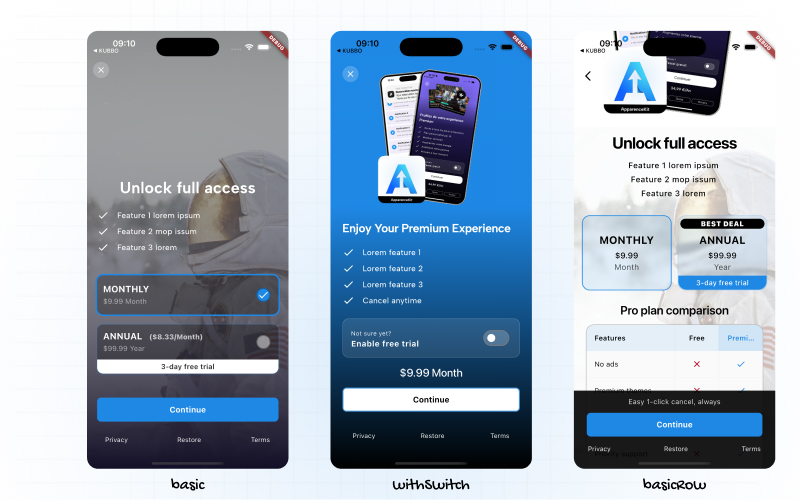
Available paywalls
All available paywalls are located in the subscription module in the PaywallFactory located lib/modules/subscription/ui/components/premium_page_factory.dart .
By default it contains 3 different paywalls :
- Basic : A basic paywall showing prices in lines
- withSwitch : A paywall with a switch to toggle between free trial and no free trial prices
- basicRows : A paywall showing prices in rows
To switch between paywalls, you just have to change the paywall type in the PremiumPage like this:
final paywallFactory = PaywallFactory.basic; // change this to switch paywallsA/B testing paywalls
To maximize conversion rates, you can A/B test different paywalls to see which one performs the best with your users. To do that, you can use a remote config solution like Firebase Remote Config
final configuredPaywall = ref
  .read(remoteConfigApiProvider)
  .subscription
  .paywall;

final paywallFactory = switch (configuredPaywall) {
  'withSwitch' => PaywallFactory.withSwitch,
  _ => PaywallFactory.basic,
};
Create your own paywall
If you want to create your own paywall, you can use the provided widgets to build your own paywall.
All provided widgets are located in the lib/modules/subscription/ui/widgets/ folder.
You can use the following widgets to build your own paywall:
ComparisonTableComponent: A widget to show a comparison table between free and premium featuresFeatureLine: A widget to show a feature line with an icon (or not) in the headerSelectableCol: A widget to show a selectable column for the pricesSelectableRow: A widget to show a selectable row for the prices ... and more.
How to create a custom paywall
Take one paywall and duplicate it. Change the class name and the file name. Then customize it as you want using the provided widgets.
Finally, add your paywall to the PaywallFactory in the premium_page_factory.dart file.
Then switch to your new paywall by changing the paywall type in the PremiumPage.
Paywalls are a key element to monetize your app using subscriptions. Take your time to design and test different paywalls to find the one that works best for Test different paywalls + pricing + texts to maximize conversion rates.